
For each variable in the Scaling section, select a scaling method such as Min–Max and click “Finalize Scaling”.
When scaling is complete, the screen automatically proceeds to the AI Analysis (AI Training) section.
If preprocessing has already been applied to the data, select None.
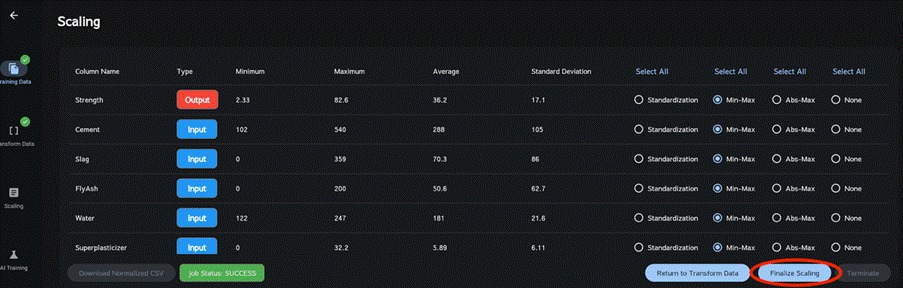
Please note that preprocessing cannot be undone. If you wish to try a different preprocessing method, click “Return to Transform Data” or create a new task. It is advisable to select the same preprocessing method for each variable, especially when there are multiple target variables. In such cases, Min-Max is recommended.
If the data contains all zeros or the same numeric value, the preprocessing methods “None” and “Abs-Max” will be automatically selected, and they cannot be changed. This is a measure to avoid preprocessing errors, so please use them as they are.


